응시자 필기 점수 현황(2026-10-19일 기준)
| 번호 | 이름 | 1 | 2 | 3 | 4 | 5 | 6 | 7 | 8 | 9 | 10 |
|---|---|---|---|---|---|---|---|---|---|---|---|
| 1 | 박광효 | 100 | 100 | 100 | 100 | 100 | 100 | 100 | 100 | 100 | 100 |
| 2 | 김정환 | 100 | 100 | 100 | 100 | 100 | 100 | 100 | 100 | 100 | 100 |
| 3 | 박주용 | 100 | 100 | 100 | 100 | 100 | 100 | 100 | 100 | 100 | 100 |
| 4 | 이연우 | 100 | 100 | 100 | 100 | 100 | 100 | 100 | 100 | 100 | 100 |
| 5 | 윤성용 | 100 | 100 | 100 | 100 | 100 | 100 | 100 | 100 | 100 | 100 |
| 6 | 윤석영 | 100 | 100 | 100 | 100 | 100 | 100 | 100 | 100 | 100 | 100 |
| 7 | 김승범 | 100 | 100 | 100 | 100 | 100 | 100 | 100 | 100 | 100 | 100 |
| 8 | 김효린 | 100 | 100 | 100 | 100 | 100 | 100 | 100 | 100 | 100 | 100 |
| 9 | 장한샘 | 100 | 100 | 100 | 100 | 100 | 100 | 100 | 100 | 100 | 100 |
| 10 | 조병헌 | 100 | 100 | 100 | 100 | 100 | 100 | 100 | 100 | 100 | 100 |
| 11 | 김태우 | 100 | 100 | 100 | 100 | 100 | 100 | 100 | 100 | 100 | 100 |
| 12 | 박시현 | 100 | 100 | 100 | 100 | 100 | 100 | 100 | 100 | 100 | 100 |
| 13 | 변재하 | 100 | 100 | 100 | 100 | 100 | 100 | 100 | 100 | 100 | 100 |
| 14 | 서필성 | 100 | 100 | 100 | 100 | 100 | 100 | 100 | 100 | 100 | 100 |
| 15 | 오태호 | 100 | 100 | 100 | 100 | 100 | 100 | 100 | 100 | 100 | 100 |
| 16 | 임서준 | 100 | 100 | 100 | 100 | 100 | 100 | 100 | 100 | 100 | 100 |
| 17 | 조한빈 | 100 | 100 | 100 | 100 | 100 | 100 | 100 | 100 | 100 | 100 |
2026-10-18 교육내용
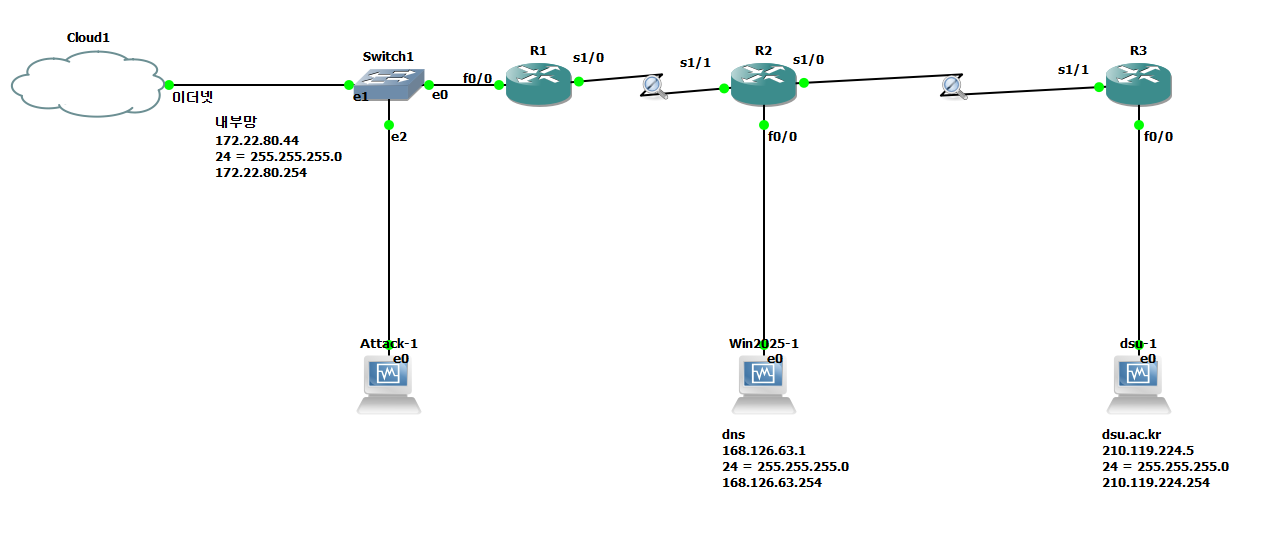
GNS3(라우터 연습)
http://virtual.izerone.co.kr:8101/note23
http://virtual.izerone.co.kr:8101/c7200-jk9s-mz.124-13b.image
R1>enable
R#configure terminal
R#config t
R1(config)#exit
hostname WOOSUK
R1#config t >exit
show
show ip interface brief
Interface
FastEthernet0/0 == GW
config t
interface FastEthernet0/0
WOOSUK(config-if)#
ip address 210.93.6.254 255.255.255.0
no shutdown ==> ping 210.93.6.254
exit
interface Serial1/0
ip address 10.10.10.1 255.255.255.252
no shutdown
exit
interface Serial1/1
ip address 10.10.10.2 255.255.255.252
no shutdown
exit
R1#ip route 210.119.224.0 255.255.255.0 10.10.10.2
R2#ip route 210.93.6.0 255.255.255.0 10.10.10.1
copy running-config startup-config
#R3
enable
config terminal
interface FastEthernet0/0
ip address 210.119.224.254 255.255.255.0
no shutdown
exit
interface Serial1/1
ip address 20.20.20.2 255.255.255.252
no shutdown
exit
ip route 172.22.87.0 255.255.255.0 20.20.20.1
ip route 10.10.10.0 255.255.255.0 20.20.20.2
ip route 168.126.63.0 255.255.255.0 20.20.20.2
ip dhcp pool DSU
network 210.119.224.0 255.255.255.0
default-router 210.119.224.254
exit
ip dhcp excluded-address 210.119.224.0
ip dhcp excluded-address 210.119.224.255
exit
copy running-config startup-config
#R2
enable
config terminal
interface FastEthernet0/0
ip address 168.126.63.254 255.255.255.0
no shutdown
exit
config t
interface Serial1/0
ip address 20.20.20.1 255.255.255.252
no shutdown
exit
interface Serial1/1
ip address 10.10.10.2 255.255.255.252
no shutdown
exit
ip route 172.22.87.0 255.255.255.0 10.10.10.1
ip route 210.119.224.0 255.255.255.0 20.20.20.2
#R1
enable
config terminal
interface FastEthernet0/0
ip address 172.22.87.254 255.255.255.0
no shutdown
exit
interface Serial1/0
ip address 10.10.10.1 255.255.255.252
no shutdown
exit
ip route 210.119.224.0 255.255.255.0 10.10.10.2
ip route 20.20.20.0 255.255.255.0 10.10.10.2
ip route 168.126.63.0 255.255.255.0 10.10.10.2
2026-10-19
실기 최종 연습
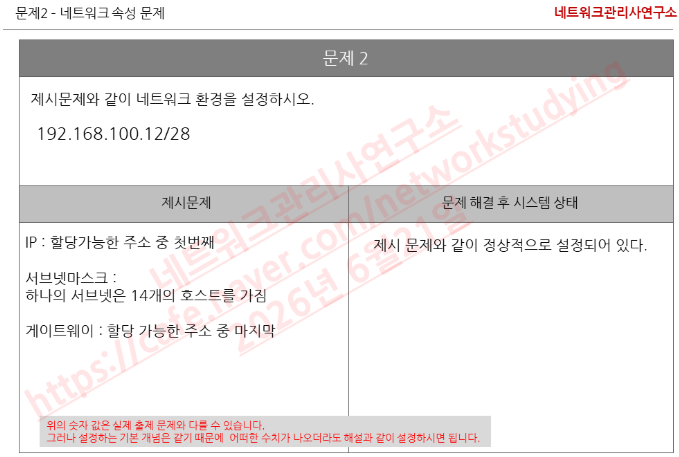
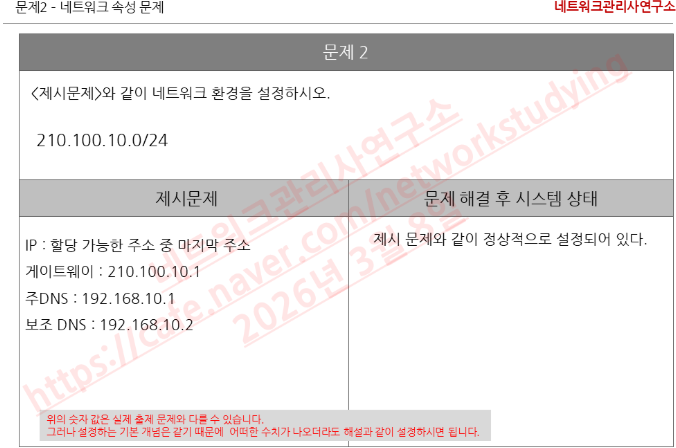
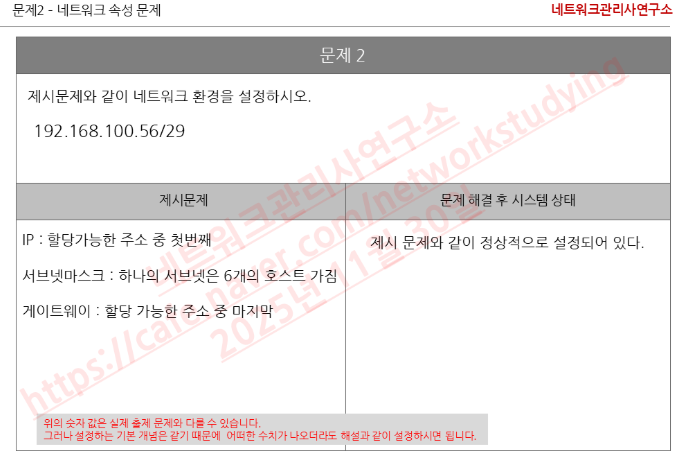
서브넷팅을 할 수 있다.
1.
2.
3.
4.
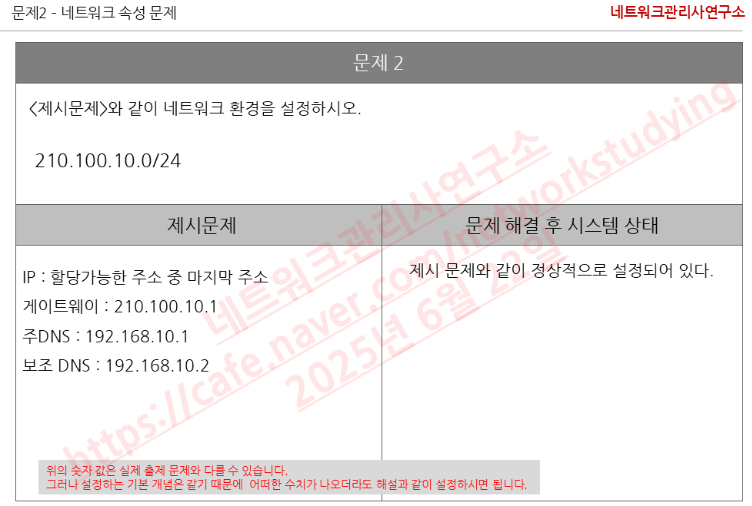
5.
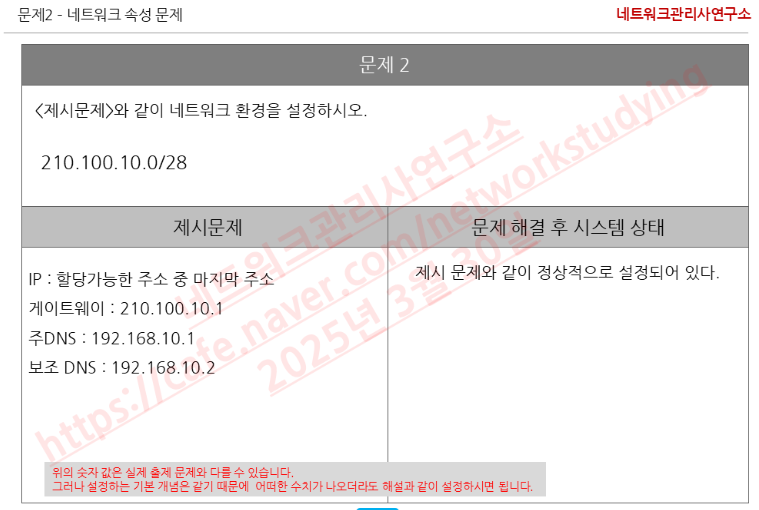
6.
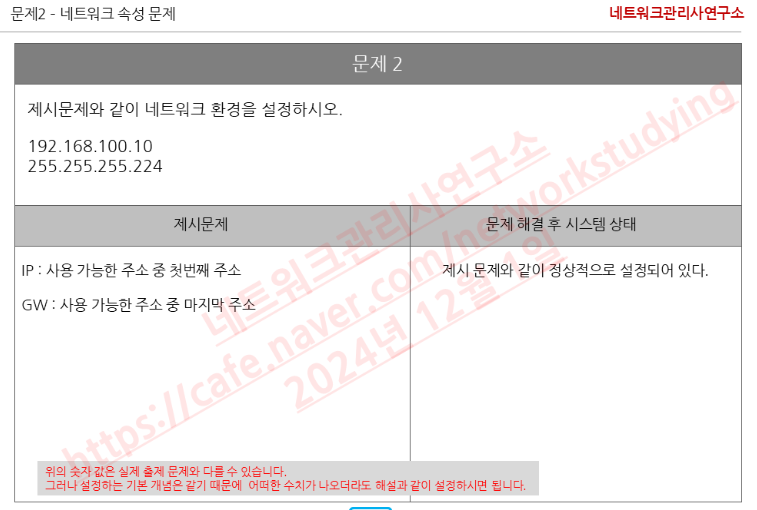
7.
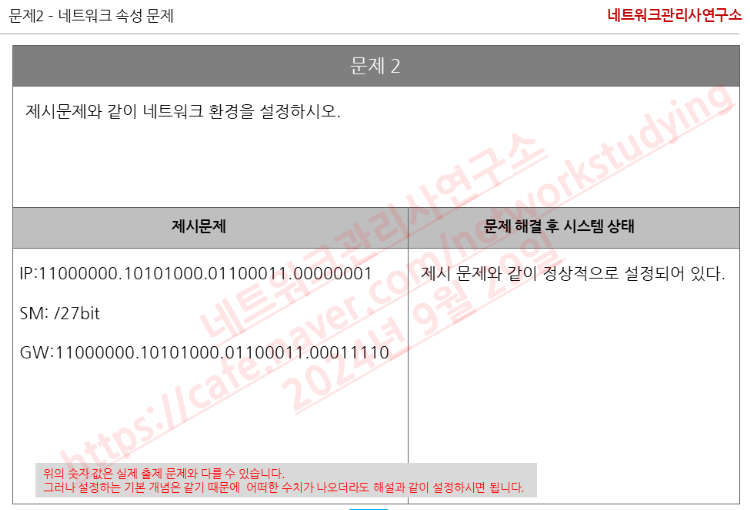
26개의 라우터 명령어를 실습한다.
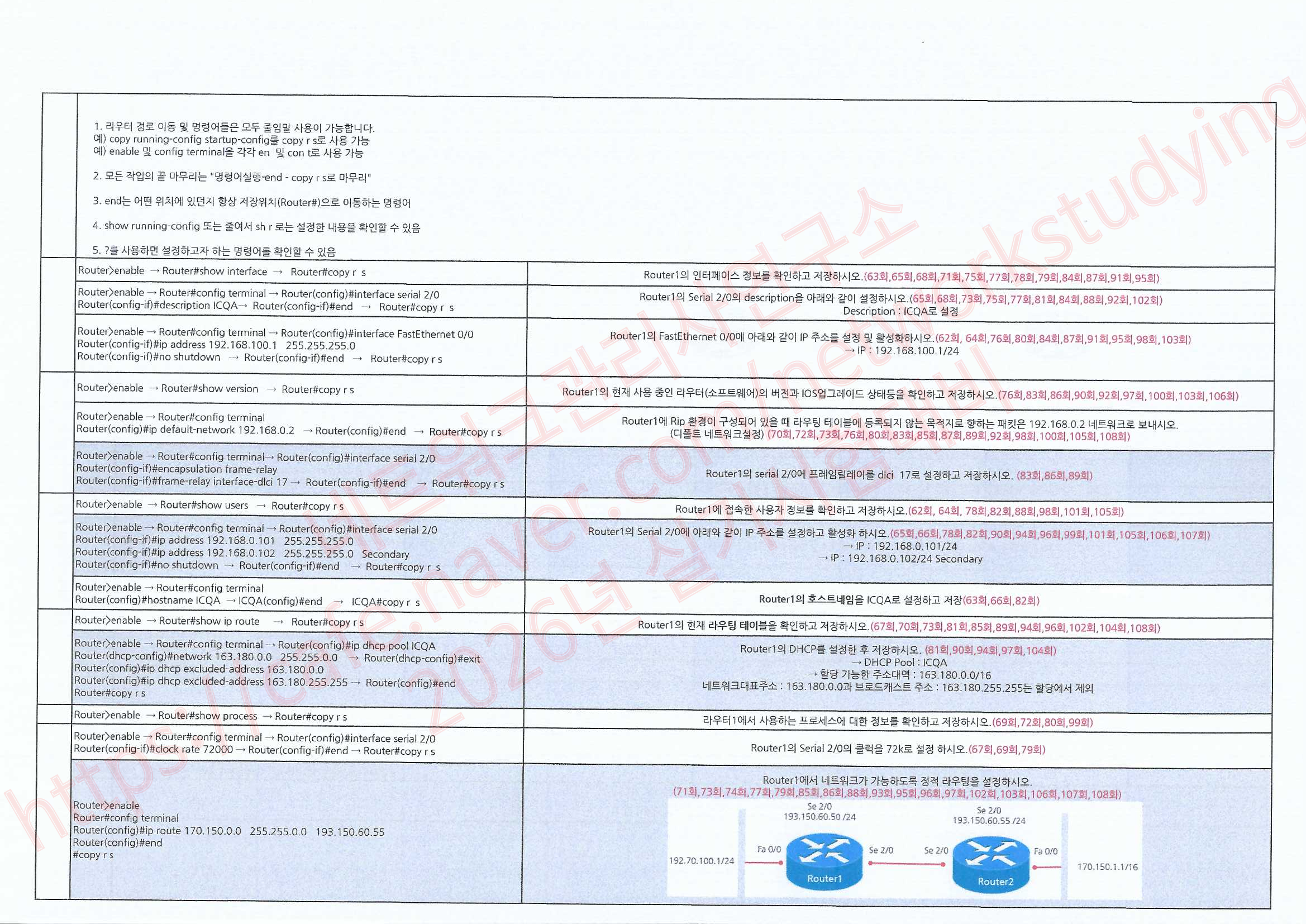
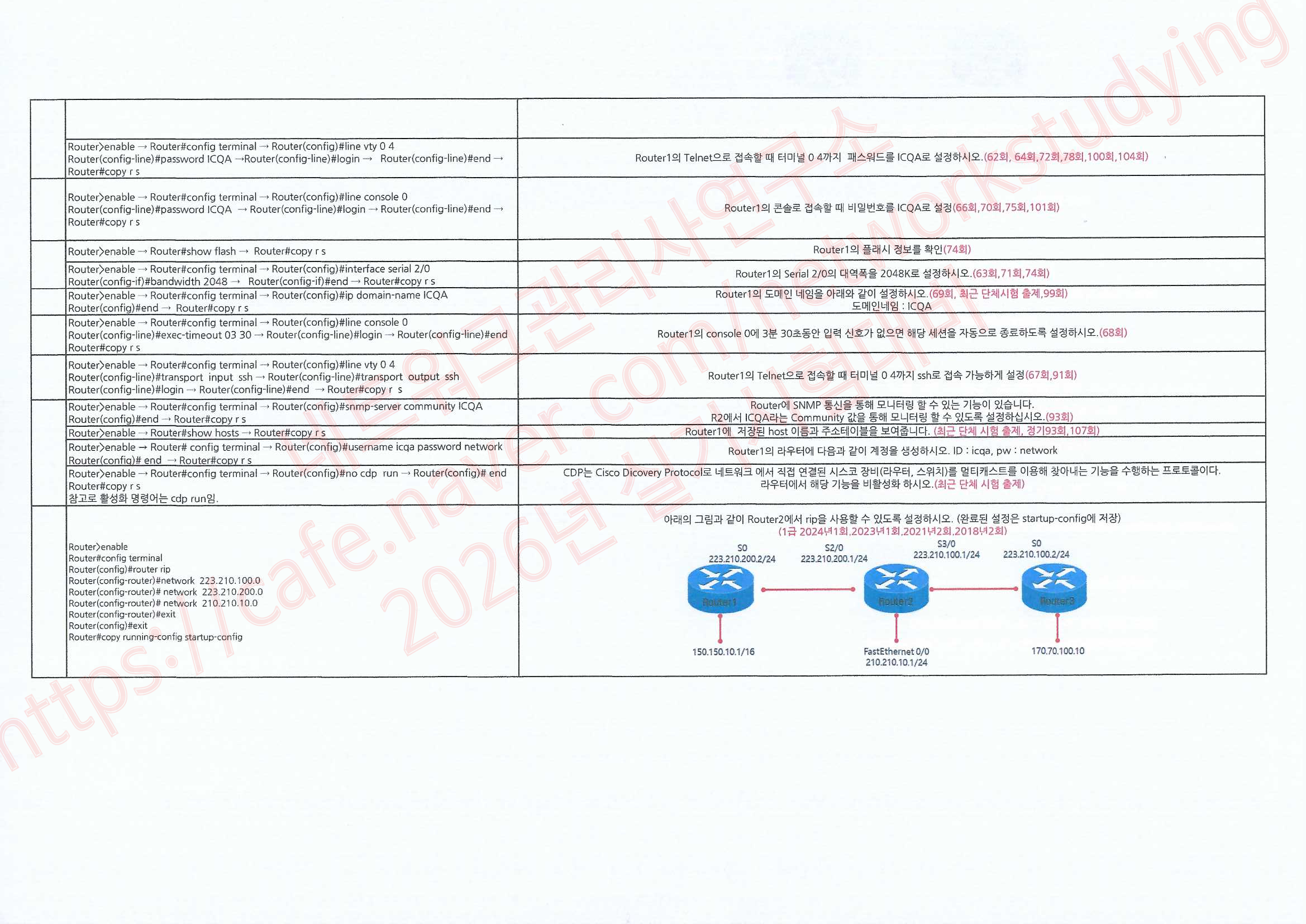
라우팅 명령어 최종 정리(GNS3 라우터를 이용해서 실습하기)
라우터 경로 이동 및 명령어들은 모두 줄임말 사용이 가능
모든 작업의 끝 마무리는 end copy r s
end는 어떤 위치에 있던지 항상 저장위치(Router#)으로 이동하는 명령어
show running-config 또는 sh r로 확인 가능
?를 사용하면 설정하고자 하는 명령어를 확인 할 수 있음
| 번호 | 문제 | 설정 |
|---|---|---|
| 1 | Router1의 인터페이스 정보를 확인하고 저장하시오. |
enable show interface copy r s |
| 2 | Router1의 Serial2/0의 description을 아래와 같이 설정하시오. Description : ICQA로 설정 |
enable config t interface serial 2/0 description ICQA end copy running-config startup-config |
| 3 | Router1의 FastEthernet0/0에 아래와 같이 IP주소를 설정 및 활성화하시오. IP : 192.168.100.1/24 |
enable config t interface FastEthernet0/0 ip address 192.168.100.1 255.255.255.0 no shutdown end copy r s |
| 4 | Router1의 현재 사용 중인 라우터(소프트웨어)의 버전과 IOS 업그레이드 상태등을 확인하고 저장하시오 . |
enable show version copy r s |
| 5 | Router1에 RIP환경이 구성되어 있을때 라우팅 테이블에 등록하지 않는 목적지로 향하는 패킷은 192.168.0.2 네트워크로 보내시오. (디폴트 네트워크설정) |
enable config t ip default-network 192.168.0.2 end copy r s |
| 6 | Router1의 Serial2/0에 프레임릴레이를 dlci 17로 설정하고 저장하시오. |
enable config t interface Serial2/0 encapsulation frame-relay frame-relay interface-dlci 17 end copy r s |
| 7 | Router1에 접속한 사용자 정보를 확인하고 저장하시오. |
enable show users copy r s |
| 8 | Router1의 Serial2/0에 아래와 같이 IP주소를 설정하고 활성화 하시오. IP : 192.168.0.101/24 IP : 192.168.0.102/24 Secondary |
enable config t interface Serial2/0 ip address 192.168.0.101 255.255.255.0 ip address 192.168.0.102 255.255.255.0 secondary no shutdown end copy r s |
| 9 | Router1의 호스트네임을 ICQA로 설정하고 저장하시오. |
enable config t hostname ICQA end copy r s |
| 10 | Router1의 현재 라우팅 테이블을 확인하고 저장하시오. |
enable show ip route end copy r s |
| 11 | Router1의 DHCP를 설정한 후 저장하시오. DHCP Pool : ICQA 할당 가능한 주소 대역 : 163.180.0.0/26 네트워크 대표 주소 : 163.180.0.0 브로드캐스트 주소 : 163.180.255.255 |
enable config t ip dhcp pool ICQA network 163.180.0.0 255.255.0.0 exit ip dhcp excluded-address 163.180.0.0 ip dhcp excluded-address 163.180.255.255 end copy r s |
| 12 | Router1에서 사용하는 프로세스에 대한 정보를 확인하고 저장하시오. |
enable show process copy r s |
| 13 | Router1의 Serial 2/0의 클럭을 72K로 설정하시오. |
enable config t interface serial2/0 clock rate 72000 end copy r s |
| 14 | Router1에서 네트워크가 가능하도록 정적라우팅을 설정하시오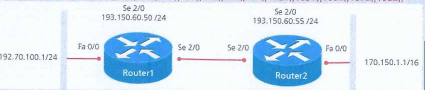 |
enable config t ip route 170.150.0.0 255.255.0.0 193.150.60.44 end copy r s |
| 15 | Router1의 Telnet으로 접속할 때 터미널 0 4까지 패스워드를 ICQA로 설정하시오. |
enable config t interface FastEthernet0/0 ip address 192.168.100.1 255.255.255.0 no shutdown end copy r s |
| 16 | Router1의 콘솔로 접속할 때 비밀번호를 ICQA로 설정하시오 |
enable config t line vty 0 4 password ICQA login end copy r s |
| 17 | Router1의 플래시 정보를 확인하시오. |
enable show flash copy r s |
| 18 | Router1의 Serial 2/0의 대역폭을 2048K로 설정하시오. |
enable config t interface serial2/0 bandwidth 2048 end copy r s |
| 19 | Router1의 도메인 네임을 아래와 같이 설정하시오. 도메인네임 : ICQA |
enable config t ip domain-name ICQA end copy r s |
| 20 | Router1의 console 0에 3분 30초 동안 입력 신호가 없으면 해당 세션을 자동으로 종료하도록 설정하시오. |
enable config t line console 0 exec-timeout 03 30 logn end copy r s |
| 21 | Router1의 Telnet으로 접속할 때 터미널 0 4까지 ssh로 접속 가능하도록 설정하시오 IP : 192.168.100.1/24 |
enable config t line vty 0 4 transport input ssh transport output ssh login end copy r s |
| 22 | Router에 SNMP 통신을 통해 모니터링 할 수 있는 기능이 있습니다. R2에서 ICQA라는 Community 값을 통해 모니터링 할 수 있도록 설정하십시오. |
enable config t snmp-server community ICQA ip address 192.168.100.1 255.255.255.0 end copy r s |
| 23 | Router1에 저장된 host이름과 주소테이블을 보여줍니다.. |
enable show hosts end copy r s |
| 24 | Router1의 라우터에 다음과 같이 계정을 생성하시오. ID: icqa, PW:network |
enable config t username icqa password network end copy r s |
| 25 | CDP는 Cisco Dicovery Protocol로 네트워크에서 직접 연결된 시스코 장비(라우터,스위치)를 멀티캐스트를 이용해서 찾아내는 기능을 수행하는 프로토콜이다. 라우터에서 해당 기능을 비활성화 하시오. |
enable config t no cdp run end copy r s |
| 26 | 아래의 그림과 같이 Router2에서 RIP을 사용할 수 있도록 설정하시오. 완료된 설정은 startup-config에 저장 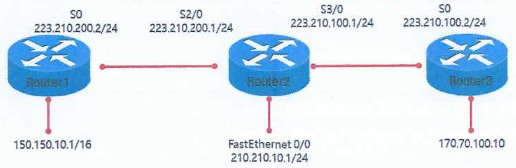 |
enable config t router rip network 223.210.100.0 network 223.210.200.0 network 210.210.10.0 end copy r s |
실기 에뮬레이터 다운받기
DHCP실습
FTP실습
IIS실습
DNS실습
보안설정
서비스
단답식
1. 리눅스 명령어
passwd
man
ifconfig
pwd
traceroute
tracert
top
netstat
/etc/services
chmod
kill
find
umask
yum install
dnf install
2.선택형
IPv4&IPv6비교
IP클래스 고르기
사설망 클래스 고르기
OSI7계층 암기하기
응용계층(HTTP,SMTP,SNMP,FTP,TELNET,SSH,DNS)
FTP,SSH,Telnet,SMTP,DNS,TFTP,HTTP,POP3,NNTP,IMAP,SNMP,HTTPS
서브넷팅
TCP&UDP비교
단답형문제
nat
vpn
IPSec
VLAN
VTP
포트미러링
DMZ
WAF(웹방화벽)
spoofing(스푸핑)
sniffing(스니핑)
SSH
SSL
HTTPS(443)
로드밸런스,로드밸런싱
핫스와핑
ICMP 메시지타입
RIP(최대 15홉까지 지원)
OSPF(최단거리)
패킷 필터링
프록시
루핑, 스패닝트리
표현계층
init0, init6, init5
RAID0, RAID1, RAID5
IPS(침입 차단 방지 시스템)
IDS(침입 탐지 시스템)
듀얼스택
IPv6노드가 IPv4전용 노드와 호환성을 유지하는 가장 쉬운 방법
DHCP
호스팅설정
cd /etc/skel
mkdir public_html
cd public_html
touch index.html
touch index.php
mkdir log
cd log
touch access.log
touch error.log
useradd 이니셜
passwd 이니셜
usermod -aG wheel master
nano /etc/pam.d/su
# uncomment the following line
auth required pam_wheel.so use_uid
nano /etc/httpd/conf.d/userdir.conf
# line 17 : comment out
#UserDir disabled
# line 24 : uncomment
UserDir public_html
# line 32,33
Directory "/home/*/public_html">
AllowOverride All # change if you need
Options None # change if you need
Require method GET POST OPTIONS
/Directory>
systemctl restart httpd
setsebool -P httpd_enable_homedirs on
restorecon -R /home
chmod 711 /home/master
chmod 755 /home/master/public_html
nano /etc/httpd/conf.d/vhost.conf
# create new
# settings for original domain
VirtualHost *:80>
DocumentRoot /home/master/public_html
ServerName dsu.ac.kr
/VirtualHost>
# settings for new domain
VirtualHost *:80>
DocumentRoot /home/이니셜/public_html
ServerName 이니셜.dsu.ac.kr
ServerAdmin webmaster@이니셜.dsu.ac.kr
ErrorLog logs/이니셜.dsu.ac.kr-error_log
CustomLog logs/이니셜.dsu.ac.kr-access_log combined
/VirtualHost>
Directory "/home/이니셜/public_html">
Options FollowSymLinks
AllowOverride All
/Directory>
systemctl restart httpd